Gym floor inspection
Resistance zone · Cable conditionIs the cable free from visible damage?
CHECKLIST SOFTWARE FOR GYMS & FITNESS STUDIOS
Opening checks on your team’s phones. Equipment faults, photos and follow-up in your manager’s view. Know what was checked before the next member walks in.
A populated demo. No account. No card.
THE STAFF APP

FOUNDRY FITNESS · OPENING
Your shift · 06:00–14:00
Is the cable free from visible damage?
THE MANAGER WORKSPACE
OPERATIONS WORKSPACE
Your team. Your checks. One clear picture.
TODAY’S ROTA
Jordan Blake 06:00–14:00Sam Parker Follow-upAlex Morgan Duty managerHANDOVER
Opening shift in progressThe next submitted check appears here.Tap “Try a failed check” on the phone. Watch it arrive in the manager’s workspace.
YOUR WORK. ON THEIR PHONE.
Cleaning routines, changing-room checks and equipment inspections all compete with serving members. A tick alone does not explain the problem. CheckControl keeps answers, notes and evidence together so the next person has the context.
Run your opening routine across the equipment and areas your team needs to inspect.
Record worn upholstery, damaged fittings or other visible defects, with a photo and the action taken.
Schedule room checks, record conditions and give cleaning or restocking routines a clear owner.
Capture the final walkthrough and carry unresolved issues into the next team’s view.
THE PHOTO. THE PERSON. THE FOLLOW-UP.
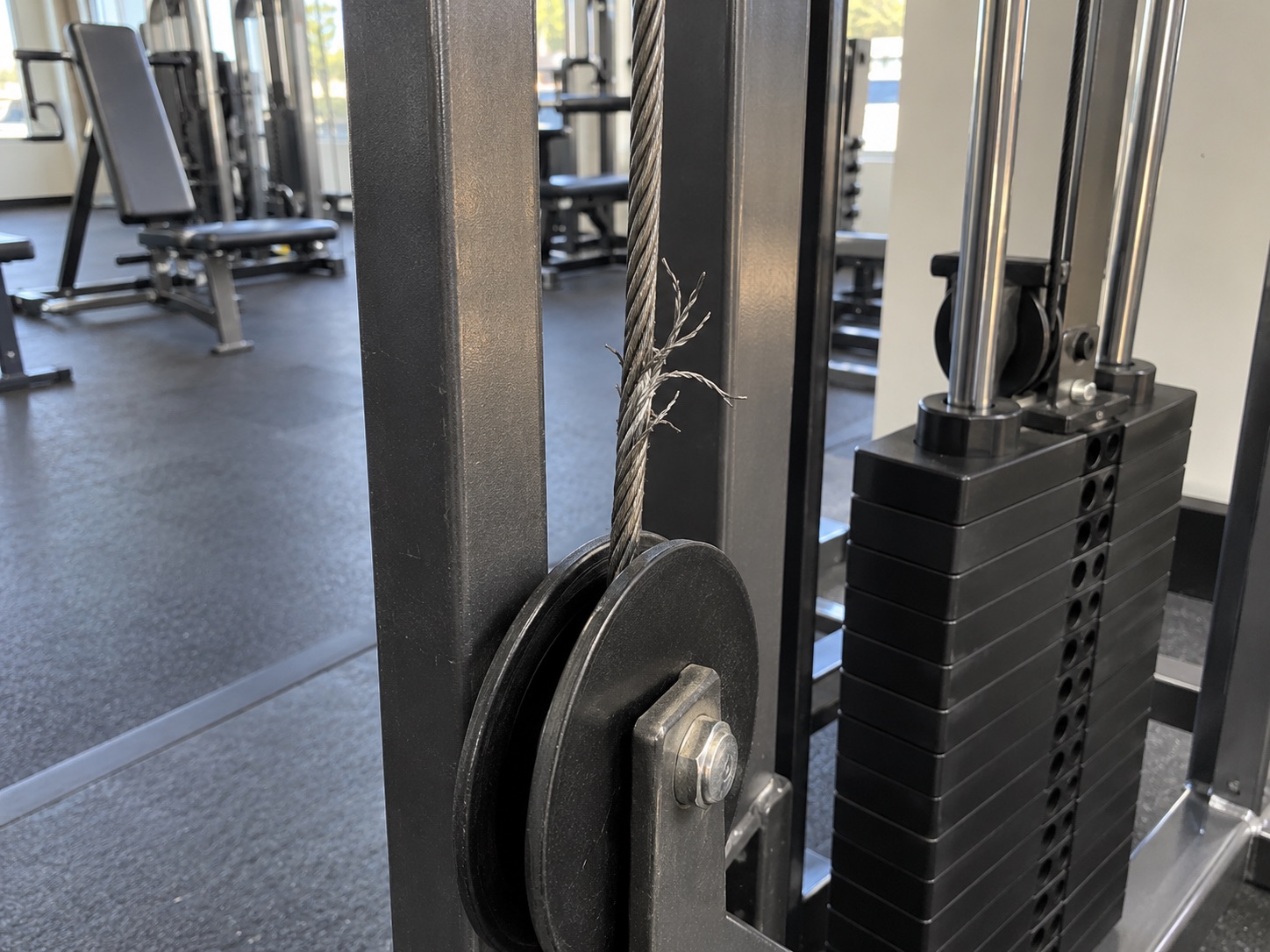
“Broken wire strands are visible on the machine cable. No load test or repair was attempted.”
Machine taken out of use and access restricted. Asset reference reported to the duty manager.
Arrange a competent equipment-service inspection and documented clearance before use.
Assign an owner and due date. Record the outcome. Keep the original failed answer in the record.
Inspect the gym issues →TEACH THE CHECK. NOT JUST THE TICK.
Build a lesson from your own procedure. Assign it to the right people. Check understanding and record practical assessment separately.
Try a staff lesson →Your procedures and assessment—not an external qualification.
PROCEDURE PREVIEW
Read the previous shift handover and confirm which equipment is out of service.
Walk the gym floor. Clear loose items and check access around each station.
Visually inspect cables, fixings, guards and upholstery using the manufacturer’s approved checklist.
WHEN SOMEONE ASKS “WAS IT DONE?”
Find the date and staff member, read the answers and inspect the photos. Export daily, weekly, monthly or yearly records as PDF or Excel.
Records of the work your team submits—not a guarantee of safety or compliance.
Explore gym reports →DEMONSTRATION RECORDFoundry Fitness / Jordan Blake
START SMALL. MAKE IT PART OF THE SHIFT.
Choose your questions and instructions. Set the standards your team should follow.
Add your team, assign routines to shifts and roles, and link the relevant learning.
See submitted and missed work. Follow up the exceptions with the evidence in front of you.
Start with a gym-floor opening routine, a changing-room check and a closing walkthrough. Use your existing standards and agree who reviews faults before inviting the team.
A GOOD FIT FOR YOUR BUSINESS?
For the people running your gym—not memberships, door access or workout tracking.
CheckControl is for the team operating the gym: checks, issue reporting, follow-up and evidence. It does not replace your membership, booking or workout-tracking software.
Yes. Create separate routines and schedule them for the relevant work, shift or role. This keeps each checklist focused.
They can use the issue-reporting flow to record the problem and supporting evidence outside a scheduled routine.
Yes. Export a branded weekly or monthly workbook, download issue PDFs or review the interactive CheckControl Report.
SEE YOUR KIND OF WORKING DAY
Fictional staff, populated checks, fault photos and training.
Switch between the team’s view and your manager workspace.