Workshop equipment inspection
Workshop bay 02 · Tool lead conditionIs the tool lead free from visible damage?
CHECKLIST SOFTWARE FOR GARAGES & WORKSHOPS
Put workshop checks on your team’s phones. Give damaged tools, spills and missed routines a photo, a location and someone responsible for the next action.
A populated demo. No account. No card.
THE STAFF APP

OAKFIELD WORKSHOP · OPENING
Your shift · 06:00–14:00
Is the tool lead free from visible damage?
THE MANAGER WORKSPACE
OPERATIONS WORKSPACE
Your team. Your checks. One clear picture.
TODAY’S ROTA
Sophie Turner 06:00–14:00Liam Roberts Follow-upMarcus Hill Duty managerHANDOVER
Opening shift in progressThe next submitted check appears here.Tap “Try a failed check” on the phone. Watch it arrive in the manager’s workspace.
YOUR WORK. ON THEIR PHONE.
A damaged tool trolley, an obstructed route or equipment that needs attention can get buried under the next job. CheckControl gives those findings a written record, a named reporter and an action your manager can follow.
Check access routes, general housekeeping and work-area readiness before the day gets busy.
Build condition checks for the equipment your team uses. Photograph defects and record the location and context.
Give end-of-day checks a clear owner, including storage, work-area condition and your agreed shutdown procedures.
Let staff report an issue when they find it, even when it is outside a scheduled checklist.
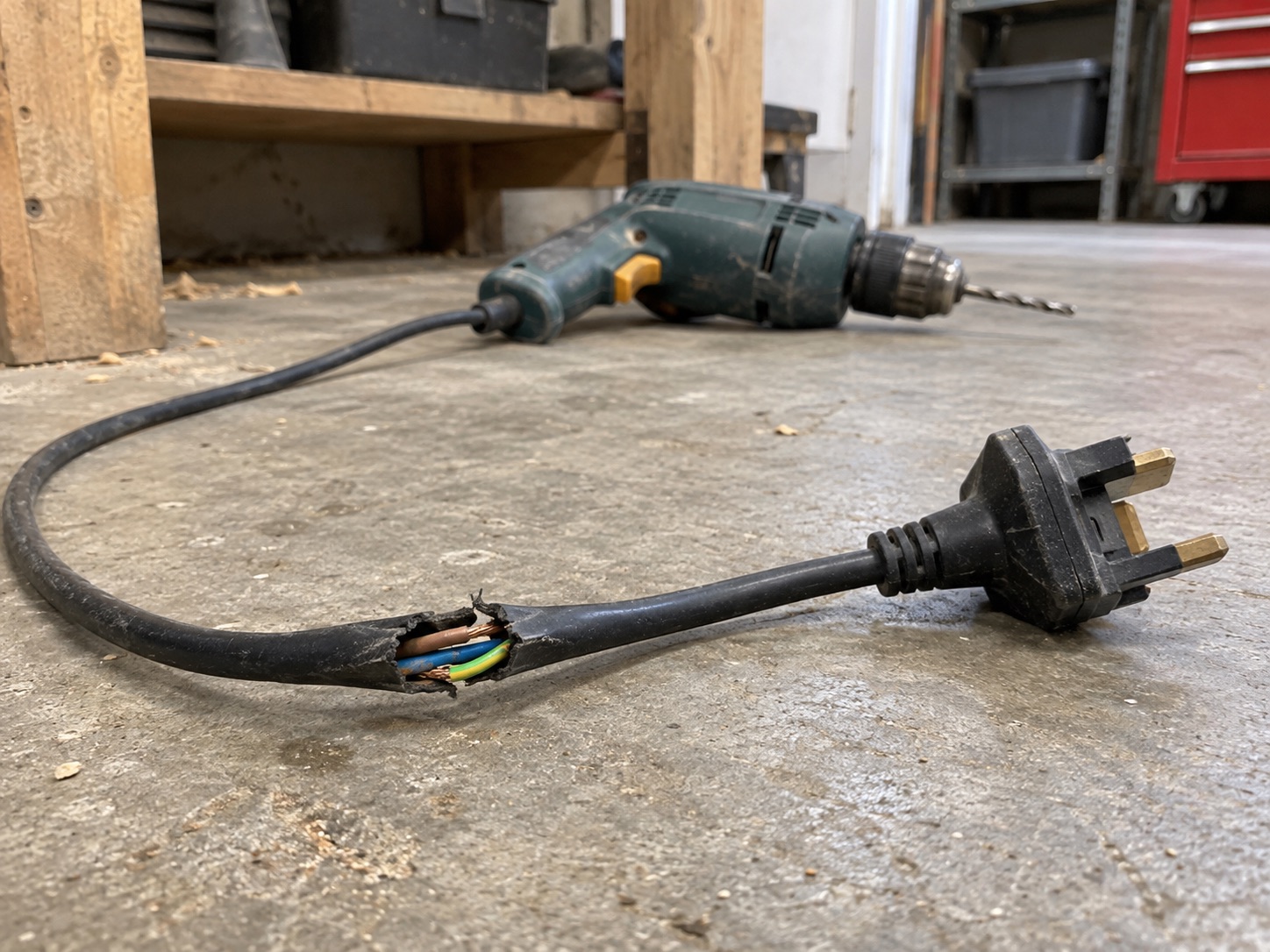
THE PHOTO. THE PERSON. THE FOLLOW-UP.
“Visible damage to the outer insulation on an unplugged tool lead.”
Tool kept disconnected, taken out of service and labelled for authorised inspection.
Arrange assessment by the competent maintenance provider; do not attempt a makeshift repair.
Assign an owner and due date. Record the outcome. Keep the original failed answer in the record.
Inspect the workshop issues →TEACH THE CHECK. NOT JUST THE TICK.
Build a lesson from your own procedure. Assign it to the right people. Check understanding and record practical assessment separately.
Try a staff lesson →Your procedures and assessment—not an external qualification.
PROCEDURE PREVIEW
Review the job allocation, handover and restrictions before starting work.
Check the bay floor, access route and surrounding work area for obstructions or spills.
Visually inspect tools and equipment against the approved pre-use checklist. Only trained staff may operate lifting equipment.
WHEN SOMEONE ASKS “WAS IT DONE?”
Find the date and staff member, read the answers and inspect the photos. Export daily, weekly, monthly or yearly records as PDF or Excel.
Records of the work your team submits—not a guarantee of safety or compliance.
Explore workshop reports →DEMONSTRATION RECORDOakfield Workshop / Sophie Turner
START SMALL. MAKE IT PART OF THE SHIFT.
Choose your questions and instructions. Set the standards your team should follow.
Add your team, assign routines to shifts and roles, and link the relevant learning.
See submitted and missed work. Follow up the exceptions with the evidence in front of you.
Choose one workshop routine first. Add your work areas, equipment-condition questions and team, then agree who reviews new faults and owns the follow-up.
A GOOD FIT FOR YOUR BUSINESS?
Operational checks and follow-up—not vehicle diagnostics, MOT certification or garage job management.
CheckControl covers operational checks, evidence and issue follow-up. Use your existing systems for bookings, vehicle diagnostics, MOT records and repair-job management.
Yes. Staff can attach photo evidence and an explanation to a finding. Managers can review the record and download the relevant PDF.
Managers can assign issue responsibility, record the next action and set a due date. The person carrying out the work still needs to follow your workshop procedures.
Yes. Choose a weekly or monthly report to review submitted routines, missed work, failed answers and reported issues. The interactive report also lets you drill into individual days and staff.
SEE YOUR KIND OF WORKING DAY
Fictional staff, populated checks, fault photos and training.
Switch between the team’s view and your manager workspace.